Python Tutorial With Jupyter notebooks
OPEN IN COLABThis tutorial was originally written by Justin Johnson for cs231n. It was adapted as a Jupyter notebook for Stanford cs228 by Volodymyr Kuleshov and Isaac Caswell. This version has been adapted for Colab by Kevin Zakka for the Spring 2020 edition of cs231n. It runs Python3 by default.
Yifeng Zhu made modifications for ECE491/591-Fall 2022.
Vikas Dhiman made modifications for ECE49x/59x
Introduction
Python is a great general-purpose programming language on its own, but with the help of a few popular libraries (numpy, scipy, matplotlib) it becomes a powerful environment for scientific computing.
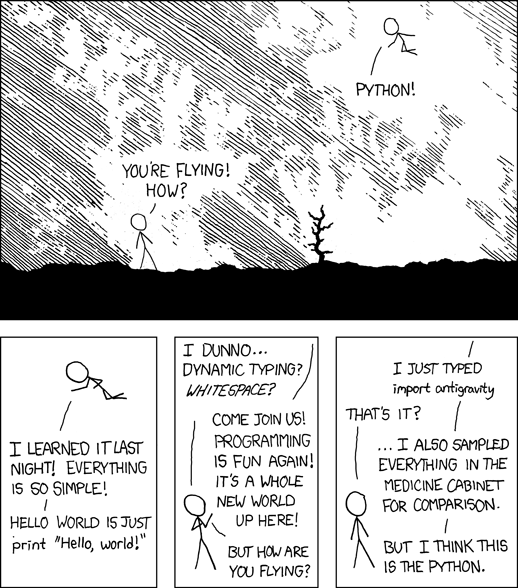
Python for C programmers
Python is simpler programming language as compared to C++. It has only a few builtin concepts and a large standard library.
Differences between C and Python
C is compiled vs Python is interpreted (Python executable converts each line to machine instructions one statement at a time.)
C is statically typed vs Python is dynamically typed.
C does not have memory management. You have to
free()the memory yourself after youmalloc()the memory. Python manages memory using reference counting. When number of references to a memory location go to zero, the memory is freed.C variable scope is defined by curly braces. Python variable scope is only defined by Classes, functions and modules.
C does not have operator overloading, which means that you cannot define the meaning of +, -, * for your own classes. Python can.
# Print the philosophy of Python
import this
The Zen of Python, by Tim Peters
Beautiful is better than ugly.
Explicit is better than implicit.
Simple is better than complex.
Complex is better than complicated.
Flat is better than nested.
Sparse is better than dense.
Readability counts.
Special cases aren't special enough to break the rules.
Although practicality beats purity.
Errors should never pass silently.
Unless explicitly silenced.
In the face of ambiguity, refuse the temptation to guess.
There should be one-- and preferably only one --obvious way to do it.
Although that way may not be obvious at first unless you're Dutch.
Now is better than never.
Although never is often better than *right* now.
If the implementation is hard to explain, it's a bad idea.
If the implementation is easy to explain, it may be a good idea.
Namespaces are one honking great idea -- let's do more of those!
In this tutorial, we will cover:
Basic Python: Basic data types (Containers, Lists, Dictionaries, Sets, Tuples), Functions, Classes
IPython: Creating notebooks, Typical workflows
A Brief Note on Google Colab and Jupyter notebooks
Google Colab is a Google hosted version of Jupyter notebooks. Jupyter notebooks are great for teaching, presentations and trying out small portions of code, but they do not work well with multi-file projects. We enourage you to grow out of notebooks use the tool most appropriate for your need.
Jupyter notebooks and bash
Jupyter notebooks contain “cells”. “Text cells” are rendered as markdown. “Code cells” are executed. All the stdout (standard output) and stderr (standard error) output is saved in the next cell called the “Output cell”. The “Output cell” stores the output untill it is explicity cleared or over written.
We will come to Python code in the next section. Let start with running bash commands in Jupyter notebooks.
Any command starting with a “!” is passed to the shell like bash.
!echo $SHELL/bin/bash
You can run any bash command and linux command that are provided by the OS that is running the Jupyter notebook.
!uname -aLinux office-desktop 6.8.0-60-generic #63~22.04.1-Ubuntu SMP PREEMPT_DYNAMIC Tue Apr 22 19:00:15 UTC 2 x86_64 x86_64 x86_64 GNU/Linux
What is your username?
!iduid=1000(vdhiman) gid=1001(vdhiman) groups=1001(vdhiman),4(adm),24(cdrom),27(sudo),30(dip),46(plugdev),119(lpadmin),136(vboxusers),138(docker),1000(sambashare)
Recall the linux commands from ECE177: one page quick reference on the linux command line
!python3 --versionPython 3.10.12
!ls2023-01-26-python-1-slides-chalkboard.json
2023-01-26-python-1-slides.html
app.py
colab-badge.svg
floatbinary
floatbinary.c
hash-table.png
helloworld
helloworld.c
helloworld.py
IEEE_754_Double_Floating_Point_Format.png
IEEE_754_Double_Floating_Point_Format.svg
imgs
main.py
__pycache__
Python_1.ipynb
Python_2.ipynb
Python_3.ipynb
test
xkcd-py-antigravity.png
!pwd/home/vdhiman/wrk/t/ECE490/book/ECE490-F25-Neural-Networks/notebooks/01-py-intro
!mkdir testmkdir: cannot create directory ‘test’: File exists
# Let us not forget our real home location so that we can
# comeback to it
if not 'workbookDir' in globals(): # check if the variable exists
    import os
    workbookDir = os.getcwd() # save the CWD (current working directory) to a variable
# always start in that directory before the next few cells
%cd $workbookDir/home/vdhiman/wrk/t/ECE490/book/ECE490-F25-Neural-Networks/notebooks/01-py-intro
/home/vdhiman/.local/venvs/ece490/lib/python3.10/site-packages/IPython/core/magics/osm.py:417: UserWarning: This is now an optional IPython functionality, setting dhist requires you to install the `pickleshare` library.
self.shell.db['dhist'] = compress_dhist(dhist)[-100:]
You cannot use ! to navigate the file systems. Instead, you need to use % to change the directory.
!cd test%pwd'/home/vdhiman/wrk/t/ECE490/book/ECE490-F25-Neural-Networks/notebooks/01-py-intro'%cd test/home/vdhiman/wrk/t/ECE490/book/ECE490-F25-Neural-Networks/notebooks/01-py-intro/test
%pwd'/home/vdhiman/wrk/t/ECE490/book/ECE490-F25-Neural-Networks/notebooks/01-py-intro/test'The magic command %alias is used to define magic aliases to system commands. %alias without any arguments lists the predefined system commands mapped to magic commands.
%aliasTotal number of aliases: 12
[('cat', 'cat'),
('cp', 'cp'),
('ldir', 'ls -F -o --color %l | grep /$'),
('lf', 'ls -F -o --color %l | grep ^-'),
('lk', 'ls -F -o --color %l | grep ^l'),
('ll', 'ls -F -o --color'),
('ls', 'ls -F --color'),
('lx', 'ls -F -o --color %l | grep ^-..x'),
('mkdir', 'mkdir'),
('mv', 'mv'),
('rm', 'rm'),
('rmdir', 'rmdir')]Note that %ls is mapped to ls -F -o --color. You can get more help on the ls command on your system by running it with --help flag.
%ls --helpUsage: ls [OPTION]... [FILE]...
List information about the FILEs (the current directory by default).
Sort entries alphabetically if none of -cftuvSUX nor --sort is specified.
Mandatory arguments to long options are mandatory for short options too.
-a, --all do not ignore entries starting with .
-A, --almost-all do not list implied . and ..
--author with -l, print the author of each file
-b, --escape print C-style escapes for nongraphic characters
--block-size=SIZE with -l, scale sizes by SIZE when printing them;
e.g., '--block-size=M'; see SIZE format below
-B, --ignore-backups do not list implied entries ending with ~
-c with -lt: sort by, and show, ctime (time of last
modification of file status information);
with -l: show ctime and sort by name;
otherwise: sort by ctime, newest first
-C list entries by columns
--color[=WHEN] colorize the output; WHEN can be 'always' (default
if omitted), 'auto', or 'never'; more info below
-d, --directory list directories themselves, not their contents
-D, --dired generate output designed for Emacs' dired mode
-f do not sort, enable -aU, disable -ls --color
-F, --classify append indicator (one of */=>@|) to entries
--file-type likewise, except do not append '*'
--format=WORD across -x, commas -m, horizontal -x, long -l,
single-column -1, verbose -l, vertical -C
--full-time like -l --time-style=full-iso
-g like -l, but do not list owner
--group-directories-first
group directories before files;
can be augmented with a --sort option, but any
use of --sort=none (-U) disables grouping
-G, --no-group in a long listing, don't print group names
-h, --human-readable with -l and -s, print sizes like 1K 234M 2G etc.
--si likewise, but use powers of 1000 not 1024
-H, --dereference-command-line
follow symbolic links listed on the command line
--dereference-command-line-symlink-to-dir
follow each command line symbolic link
that points to a directory
--hide=PATTERN do not list implied entries matching shell PATTERN
(overridden by -a or -A)
--hyperlink[=WHEN] hyperlink file names; WHEN can be 'always'
(default if omitted), 'auto', or 'never'
--indicator-style=WORD append indicator with style WORD to entry names:
none (default), slash (-p),
file-type (--file-type), classify (-F)
-i, --inode print the index number of each file
-I, --ignore=PATTERN do not list implied entries matching shell PATTERN
-k, --kibibytes default to 1024-byte blocks for disk usage;
used only with -s and per directory totals
-l use a long listing format
-L, --dereference when showing file information for a symbolic
link, show information for the file the link
references rather than for the link itself
-m fill width with a comma separated list of entries
-n, --numeric-uid-gid like -l, but list numeric user and group IDs
-N, --literal print entry names without quoting
-o like -l, but do not list group information
-p, --indicator-style=slash
append / indicator to directories
-q, --hide-control-chars print ? instead of nongraphic characters
--show-control-chars show nongraphic characters as-is (the default,
unless program is 'ls' and output is a terminal)
-Q, --quote-name enclose entry names in double quotes
--quoting-style=WORD use quoting style WORD for entry names:
literal, locale, shell, shell-always,
shell-escape, shell-escape-always, c, escape
(overrides QUOTING_STYLE environment variable)
-r, --reverse reverse order while sorting
-R, --recursive list subdirectories recursively
-s, --size print the allocated size of each file, in blocks
-S sort by file size, largest first
--sort=WORD sort by WORD instead of name: none (-U), size (-S),
time (-t), version (-v), extension (-X)
--time=WORD change the default of using modification times;
access time (-u): atime, access, use;
change time (-c): ctime, status;
birth time: birth, creation;
with -l, WORD determines which time to show;
with --sort=time, sort by WORD (newest first)
--time-style=TIME_STYLE time/date format with -l; see TIME_STYLE below
-t sort by time, newest first; see --time
-T, --tabsize=COLS assume tab stops at each COLS instead of 8
-u with -lt: sort by, and show, access time;
with -l: show access time and sort by name;
otherwise: sort by access time, newest first
-U do not sort; list entries in directory order
-v natural sort of (version) numbers within text
-w, --width=COLS set output width to COLS. 0 means no limit
-x list entries by lines instead of by columns
-X sort alphabetically by entry extension
-Z, --context print any security context of each file
-1 list one file per line. Avoid '\n' with -q or -b
--help display this help and exit
--version output version information and exit
The SIZE argument is an integer and optional unit (example: 10K is 10*1024).
Units are K,M,G,T,P,E,Z,Y (powers of 1024) or KB,MB,... (powers of 1000).
Binary prefixes can be used, too: KiB=K, MiB=M, and so on.
The TIME_STYLE argument can be full-iso, long-iso, iso, locale, or +FORMAT.
FORMAT is interpreted like in date(1). If FORMAT is FORMAT1<newline>FORMAT2,
then FORMAT1 applies to non-recent files and FORMAT2 to recent files.
TIME_STYLE prefixed with 'posix-' takes effect only outside the POSIX locale.
Also the TIME_STYLE environment variable sets the default style to use.
Using color to distinguish file types is disabled both by default and
with --color=never. With --color=auto, ls emits color codes only when
standard output is connected to a terminal. The LS_COLORS environment
variable can change the settings. Use the dircolors command to set it.
Exit status:
0 if OK,
1 if minor problems (e.g., cannot access subdirectory),
2 if serious trouble (e.g., cannot access command-line argument).
GNU coreutils online help: <https://www.gnu.org/software/coreutils/>
Full documentation <https://www.gnu.org/software/coreutils/ls>
or available locally via: info '(coreutils) ls invocation'
Cell magics
Apart from line magics, Ipython has cell magics which start with double percentage sign like %%.
%%capture is one such cell magic that captures the output of a cell to a python variable.
The following example captures the output to a variable called capt.
%%capture capt
import sys
print('Hello stdout')
print('and stderr', file=sys.stderr)Now you can inspect the stdout (Standard output) and stderr (Standard errorr) of the comands programatically. We will use this feature for outmatic grading of certain questions in this notebook.
capt.stdout, capt.stderr('Hello stdout\n', 'and stderr\n')capt.show()Hello stdout
and stderr
%cd $workbookDir/test
!touch hi.txt
!sleep 1
!touch alive.txt
!sleep 1
!touch bye.txt
%cd $workbookDir/home/vdhiman/wrk/t/ECE490/book/ECE490-F25-Neural-Networks/notebooks/01-py-intro/test
/home/vdhiman/wrk/t/ECE490/book/ECE490-F25-Neural-Networks/notebooks/01-py-intro
Question 1.
Go through the help of %ls command. Call %ls with the right flags to list files in the current directory sorted by time. It should list the files in the test directory in the following order bye.txt alive.txt hi.txt (2 marks)
%%capture lsoutput
%cd -q $workbookDir/test
# Write the magic %ls command with the correct flags here
...
%cd -q $workbookDirlsoutput.show()# The following test should pass
def test_ls_output(lsoutput):
expected_output = 'bye.txt alive.txt hi.txt'
assert lsoutput.stdout.strip() == expected_output.strip(), lsoutput.stdout
test_ls_output(lsoutput)---------------------------------------------------------------------------
AssertionError Traceback (most recent call last)
Cell In[23], line 5
3 expected_output = 'bye.txt alive.txt hi.txt'
4 assert lsoutput.stdout.strip() == expected_output.strip(), lsoutput.stdout
----> 5 test_ls_output(lsoutput)
Cell In[23], line 4, in test_ls_output(lsoutput)
2 def test_ls_output(lsoutput):
3 expected_output = 'bye.txt alive.txt hi.txt'
----> 4 assert lsoutput.stdout.strip() == expected_output.strip(), lsoutput.stdout
AssertionError: Question 2
What is the difference between “!cd directory” and “%cd directory”?
Answer
!cd directory does not change the directory persistently but %cd does.
# always start in that directory before the next few cells
%cd $workbookDirRunning C programs in Jupyter notebooks
There are versions of Jupyter Notebooks where you can run C programs line by line. For example, xeus-cling project. Google does not support that however, so we are going to use the magic command : %%witefile filename to write C program to file which can then be compiled and executed.
%%writefile helloworld.c
#include <stdio.h>
int main() {
  printf("hello world from C!\n");
}
When you start a “cell” with magic command %%writefile <filename>, the remaining contents of the cell get written into a the file with given filename. You can then manipulate the file like you would have in a terminal.
!gcc helloworld.c -o helloworld && ./helloworldBasics of Python
Python is a high-level, dynamically typed programming language. Python code is often said to be almost like pseudocode, since it allows you to express very powerful ideas in very few lines of code while being very readable. As an example, here is an implementation of the classic quicksort algorithm in Python:
def quicksort(arr):
    if len(arr) <= 1:
        return arr
    pivot = arr[len(arr) // 2] # Split arr in half
    left = [x for x in arr if x < pivot] # Take elements smaller than pivot
    middle = [x for x in arr if x == pivot]
    right = [x for x in arr if x > pivot] # Take elements greater than pivot
    return quicksort(left) + middle + quicksort(right) # Concatenate lists

print(quicksort([3,6,8,10,1,2,1]))
Hello world in Python
Print the hello world! Unlike C, Python does not “need” a main function to run. All the lines are executed one by one. Semicolons are optional.
print("hello world from Python!")You can run this single line from a python file.
%%writefile helloworld.py
print("hello world from Python file!")
You can run any python file using the python executable.
!python3 helloworld.pyAlthough all lines are executed, it is customary to separate function and class definitions from what can be executed using if __name__ == '__main__' condition. This class is only true if the file is called as a top-level script.
%%writefile helloworld_main.py
def foo():
    print("Function foo was called")

print("Inside the script ", __name__)
if __name__ == '__main__':
    print("Hello world from __name___ == '__main__' condition")
!python3 helloworld_main.pyHaving the __name__ == '__main__' condition allows one to import helloworld-main, without executing certain lines of code.
import helloworld_mainNote that with import statement the module name helloworld_name is assigned to the special variable __name__. Learn more here.
Jupyter cells automatically print the last expression to stdout. Specifically, the last statement must be an expression statement.
For example, you do not need the print() function to print “hello world!” from Jupyter cell.
"Hello world from Jupyter cell!"You can suppress the output by making the last statement, not an “expression statement”. You can do it by assining this to another variable, for example.
x = "Hello world from Jupyter cell!" # this will not be printed by Juputer cellJust listing the variables in the last line of the Code cell, prints them to the output.
x = "Hello world from Jupyter cell!"
x # This will be printed
Just like Matlab, you can suppress the output of a variable by using semicolon.
x = "Hello world from Jupyter cell!"
x; # This will NOT be printed
Remember, this printing without print() function is a feature of Jupyter notebooks, not Python language.
Builin data types
The principal built-in types are
Numerics
Sequences
Mappings
Classes
Instances
Exceptions.
Numerics
int (integers): numbers without a decimal ( Integers have unlimited precision. )
float (floating point numbers): numbers with a decimal ( Floating point numbers are usually implemented using double in C; information about the precision and internal representation of floating point numbers for the machine on which your program is running is available in
sys.float_info. )bool (booleans): True or False values
Sequences
str (strings): usually to represent text. However, anything that is wrapped in quotes (single or double) is treated as a string.
list (lists): Like a C array, more like C++ std::vector. Dynamically allocated and memory managed.
tuple : Like lists but immutable.
set: Like lists, mutable. Checks for uniqueness of each value.
Mappings
dict (mappings): Hash tables for key-value pairs. The keys need to be hashable.
import sys
sys.float_info # Prints the system's default float sizeNumbers
Integers and floats work as you would expect from other languages:
x = 3
(x, type(x))
print(x + 1) # Addition
print(x - 1) # Subtraction
print(x * 2) # Multiplication
print(x ** 2) # Exponentiation (not available in C)x += 1 # x = x + 1
print(x)
x *= 2 # x = x * 2
print(x)y = 2.5
print(type(y))
print(y, y + 1, y * 2, y ** 2)IEEE 754 Double-precision floating-point format

Every floating point number in modern computers is stored in IEEE 754 format. It has three parts, sign (), exponent and fraction . Here’s some code to find the exponent part and fraction part of a fraction. The sign is +1 for positive numbers and -1 for negative numbers. The fraction is always between 0 and 1. The exponent part is responsible for scaling the number so that 1+f is between 1 and 2. The value of the number is .
The following function converts a number to its binary representation by repeated division. Play with it convert some numbers whose binary representation you know. Maybe try to write an inverse function that converts from binary representation to its value, by repeated multiplication.
import math
def value2binary(n, base=2):
    """
    Find binary representation of n by repeated division
    """
    bits = []
    ncopy = n
    while ncopy > 0:
        ncopy, remainder = divmod(ncopy, base)
        bits.append(remainder)
return list(reversed(bits))value2binary(1024)The following function finds the fraction and the exponent part so that . This does not work for 0, so we dont even try.
def ieee754_exponent(n, expbits=11):
    """
    Find the exponent of n in ieee 754 representation.

    It returns both frac and exp, so that the original number is
    frac x 2^{-exp}
    """
    exp = 0
    if n == 0:
        return (None, 0)
    frac = n
    # Try for maximum number of expbits
    # The basic logic is that if the number is smaller than 1
    # then keep multiplying it by 2 until it becomes bigger than 1
    # and keep a track of how many times we multiplied it by 2
    # as the exponent $e$.
    # Do the same if the number is bigger than 2, but divide it by 2
    for _ in range(expbits-1):
        if 1 <= abs(frac) and abs(frac) < 2:
            break
        elif abs(frac) > 2:
            frac /= 2
            exp += 1
        else: # frac <= 1
            frac *= 2
            exp -= 1
    if abs(frac) < 1: raise ValueError("Number too small")
    if abs(frac) >= 2: raise ValueError("Number too big")
    return exp, frac
Try the above function for different numbers and see if it gives reasonable answers.
ieee754_exponent(0.1)Check if is indeed 0.1
1.6*(2**(-4))ieee754_exponent(0.1), ieee754_exponent(0.2), ieee754_exponent(0.3)ieee754_exponent(0.125), ieee754_exponent(0.25), ieee754_exponent(0.375)We can write an inverse function to create an automatic test case. This is called unit testing. If our function is wrong, this automatic test case should stop us from going forward without fixing it.
import random
def exponent_frac_to_number(exp, frac):
    return frac * 2**exp

def test_ieee754_exponent():
    for _ in range(100): # do this hundred times
        n = random.random()*200-100 # pick a random number between -100 and 100
        exp, frac = ieee754_exponent(n) # Conversion
        nagain = exponent_frac_to_number(exp, frac) # we should get n back again
        assert abs(nagain - n) < 2**42, f"test failed for {n}, {exp}, {frac}"

test_ieee754_exponent()
Imprecision in representing floating point numbers
Consider the following test. Adding 0.2 and 0.1 and comparing it to 0.3 fails. Why?
x = 0.2 + 0.1
x == 0.3
abs(x - 0.3) < 1e-16But if we add 0.25 and 0.125, we get exact results.
x = 0.25 + 0.125
x == 0.375
Question 3
Why cannot we get exact result when we add 0.2 and 0.1, but we do get exact results for 0.25 and 0.125? Read the documentation for using printing floating point numbers here or here. Print the number 0.1 used above to 5 and 20 decimal spaces to see how they are actually represented. The output should look like this:
0.1 = 0.10000
0.1 = 0.10000000000000000555
Further information:
%%capture q3output
# Print 0.1 to 5 decimal places
...
# Print 0.1 to 20 decimal places
...q3output.show()# The following test should pass
def test_q3output(q3output):
expected_q3output = """\
0.1 = 0.10000
0.1 = 0.10000000000000000555
"""
assert q3output.stdout == expected_q3output
test_q3output(q3output)Question 4
Read about 64-bit IEEE 754 floating point format. Find the difference between closest two binary numbers near 0.3 decimal that can be exactly represented in 64-bit IEEE 754 floating point format. Check your answer by comparing abs((0.1 + 0.2) - 0.3) <= your_answer
Hint: You have to only find the exponent part, e. The difference between closest binary numbers due to the fraction part is always 2-52 because is represented using 52 bits. Once you know the exponent, the difference is . You can use 2**(-52+e) to find the power of 2.
your_answer = ...def test_floating_point(your_answer):
assert abs(0.1+0.2-0.3) <= your_answer
test_floating_point(your_answer)Differences from C
Note that unlike many languages, Python does not have unary increment (x++) or decrement (x--) operators.
Python also has built-in types for complex numbers; you can find all of the details in the Builtin types documentation.
Booleans
Python implements all of the usual operators for Boolean logic, but uses English words rather than symbols (&&, ||, etc.):
t = True; f = False
print(type(t))
Now we let’s look at the operations:
print(t and f) # Logical AND;
print(t or f)  # Logical OR;
print(not t)   # Logical NOT;
print(t != f) # Logical XOR;NoneType
None constant can be thought of has nullptr in C. It has its own type NoneType.
n = None
type(None), type(n)Sequences
str (strings): usually to represent text. However, anything that is wrapped in quotes (single or double) is treated as a string.
list (lists): Like a C array, more like C++ std::vector. Dynamically allocated and memory managed.
tuple : Like lists but immutable.
set: Like lists, mutable. Checks for uniqueness of each value.
Strings
hello = 'he"llo'   # String literals can use single quotes
world = "world'"   # or double quotes; it does not matter
great = """Python
also has triple quotes
which can internally contain
newlines, 'single quotes' and "double quotes".
Triple quotes are often used for documentation
and multi-line comments.
"""
print(hello)
print(len(hello))
hw = hello + ', ' + world # String concatenation
print(hw)num = 12
hw12 = f'{hello:s} {world} {num:d}' # string formatting
hw12"First, thou shalt count to {0}" # References first positional argument
"Bring me a {}" # Implicitly references the first positional argument
"From {} to {}" # Same as "From {0} to {1}"
"My quest is {name}" # References keyword argument 'name'
"Weight in tons {0.weight}" # 'weight' attribute of first positional arg
"Units destroyed: {players[0]}" # First element of keyword argument 'players'.String formatting has its own mini language.
format_spec     ::=  [[fill]align][sign][#][0][width][grouping_option][.precision][type]
fill            ::=  <any character>
align           ::=  "<" | ">" | "=" | "^"
sign            ::=  "+" | "-" | " "
width           ::=  digit+
grouping_option ::=  "_" | ","
precision       ::=  digit+
type            ::=  "b" | "c" | "d" | "e" | "E" | "f" | "F" | "g" | "G" | "n" | "o" | "s" | "x" | "X" | "%"
hw12 = '%s %s %d' % (hello, world, 12) # C-style string formatting using % operator
hw12Since Python 3.8, the dominant way to format strings is to use f-string
hello = "Hell'o"
world = 'World"'
i = 12
hw12 = F'{hello:s} {world} {i:d}'# string formatting using f-strings
hw12
hw12 = hello + world + str(12)
print(hw12)hw12 = hello + ' ' + world + ' ' + str(3.1415)
print(hw12)# Yes you can use emojis (unicode support)
f"{hello} 😀 😃 😄 😁 😆 {i:d} emojies"Or you can use Unicode names for emojies
"\N{GRINNING FACE}"String objects have a bunch of useful methods; for example:
s = "hello"
print(s.capitalize())  # Capitalize a string
print(s.upper())       # Convert a string to uppercase; prints "HELLO"
print(s.rjust(7))      # Right-justify a string, padding with spaces
print(s.center(7))     # Center a string, padding with spaces
print(s.replace('l', '(ell)'))  # Replace all instances of one substring with another
s = 'hello'
s = s.upper()
print(s)You can ask for help on any python function, object or type using “?”
 # a jupyter notebook feature, not python
s.upper?
help(s.upper) # Some as s.upper? but a python featuredir(s) # List all the functions available on a string objectWhitespace: any nonprinting character, such as spaces, tabs, and end-of-line symbols
print("ECE 491/591\n\tDeep Learning\nis fun!")print(' w\to\tr l\nd '.strip()) # Strip leading and trailing whitespaceprint(' world '.rstrip()) # Strip trailing whitespaceprint(' world '.lstrip()) # Strip leading whitespaceYou can find a list of all string methods in the documentation.
Difference from C
C is statically typed vs Python is dynamically typed. You can change the type of a variable from one line to another.
x = 1
print("1. Type of x = ", type(x))
x = "str"
print("2. Type of x = ", type(x))Lists
A list is the Python equivalent of an array, but is resizeable and can contain elements of different types:
lst = [1, 2, 3, 4, 5]
print(lst)
Index Positions Start at 0, Not 1
lst[0]xs = [1, 2, 3, 'hello', [4, 5, 6]] # Create a list
print(xs)
print('First element of the array: ', xs[0]) # Index to the list starts with 0
print('Last element of the array: ', xs[4])
print(xs[4][1])# Negative indices count from the end of the list;
print(xs[-1]) # Index -1 returns the last item in the list
print(xs[-2]) # Index -2 returns the second item from the end of the listxs[2] = 'foo' # Lists can contain elements of different types
print(xs)xs.append('bar') # Add a new element to the end of the list
print(xs)print(xs)
x = xs.pop() # Remove and return the last element of the list
print(x)
print(xs)xs.insert(1, "new item") # Insert the "new item" at the index 1
print(xs)xs.remove("foo") # Removing an item by value
print(xs)As usual, you can find all the details about lists in the documentation.
Question 5
Read the Python list FAQ to find out whether Python lists are implemented as array datastructure or linked list datastructure.
Answer
Python lists are implemented as an array datastructure
colors = ["Red", "Green", "White", "Black"]
# Print the first color in the above list
print(colors[0])
# Print the last color in the above list
print(colors[-1])
# Append "Blue" to the above list
colors.append('Blue')
print(colors)
# Remove "Green" from the above list
colors.remove('Green')
print(colors)
Question 6
Find the length of the list colors.
def length_of_colors(colors):
    colors_lengths = ...
    return colors_length
def test_length_of_colors(length_of_colors):
import random
n = random.randint(1, 100)
colors = ['red'] * n
assert n == len(colors)
test_length_of_colors(length_of_colors)# Last cell should output length of the list `colors`Question 7
What is the difference between sorted(colors) and colors.sort()?
colors = ["Red", "Green", "White", "Black"]
colors2 = sorted(colors)
colors2, colors
colors.sort()
colorsAnswer
sorted returns a copy of the list without modifying the original while sort modifies the original list.
Slicing
In addition to accessing list elements one at a time, Python provides concise syntax to access sublists; this is known as slicing:
aList[start:stop:step]
aList[start:stop]
The default for start is none or 0.
The default stop is the end of your data structure.
Using a positive number references from the first element, a negative number references from last element in your structure.
# nums = range(5) # Python 2, but error in Python 3
nums = list(range(5))    # range is a built-in function that creates a list of integers
nums = [0, 1, 2, 3, 4]
print(nums)         # Prints "[0, 1, 2, 3, 4]"
print(nums[2:4])    # Get a slice from index 2 to 4 (exclusive); prints "[2, 3]"
print(nums[2:])     # Get a slice from index 2 to the end; prints "[2, 3, 4]"
print(nums[:2])     # Get a slice from the start to index 2 (exclusive); prints "[0, 1]"
print(nums[:])      # Get a slice of the whole list; prints ["0, 1, 2, 3, 4]"
print(nums[::-1])    # Slice indices can be negative; prints ["0, 1, 2, 3]"
nums[2:4] = [8, 9]  # Assign a new sublist to a slice
print(nums)         # Prints "[0, 1, 8, 9, 4]"
lst = list(range(0,100,10))
print(lst)# Print everything except the last three elements
print(lst[:-3])# Print everything with odd indices
print(lst[::2])# Print everything with even indices
print(lst[1::2])# Print everything in reversed order
print(lst[::-1])Question 8
Select 7th, 5th, and 3th element from the following list A using a single list slice
A = list(range(1,10,1)) # start,stop,step
print(A)
def ele_7th_to_3rd_list(A):
slice_7th_to_3rd = ...
return slice_7th_to_3rd
ele_7th_to_3rd_list(A)# Last cell should output length of the list `colors`Loops
You can loop over the elements of a list like this:
animals = ['cat', 'dog', 'monkey']
for animal in animals:
  print(animal)
You can print squares of first 20 numbers like this:
for i in range(1, 21):
  print(f"{i:d}^2 = {i*i:d}")
Differences from C
Unlike C there are no braces for start and end of the for loop. Instead of braces, we have a compbination of “:” colon and indentation. Unlike C, indentation is mandatory in Python.
If you want access to the index of each element within the body of a loop, use the built-in enumerate function:
animals = ['cat', 'dog', 'monkey']
for idx, animal in enumerate(animals):
    print('#{}: {}'.format(idx, animal))
Question 9
Write code to create a list of 20 elements of fibonacci series: , , and for all . Assign the list to variable called FIB20.
# Fibonacci series
FIB20 = [] # modify the list to contain fibonacci using a for loop
...
print(FIB20)
assert len(FIB20) == 20
assert FIB20[0] == 0
assert FIB20[1] == 1
assert FIB20 == [0, 1, 1, 2, 3, 5, 8, 13, 21, 34, 55, 89, 144, 233, 377, 610, 987, 1597, 2584, 4181]Copying a list
To copy a list, you can make a slice that includes the entire original list by omitting the first index and the second index ([:]). This tells Python to make a slice that starts at the first item and ends with the last item, producing a copy of the entire list.
a = [1, 2, 3, 4, 5]
b = a[:]  # copying the list
# b = a.copy() # <- preferred way
c = a     # This doesn't copy the list!

a.append('x') # a = [1, 2, 3, 4, 5, 'x']
b.append('y') # b = [1, 2, 3, 4, 5, 'y']
c.append('z') # c = [1, 2, 3, 4, 5, 'x', 'z']

print('a = ', a)
print('b = ', b)
print('c = ', c)
print('a = ', a)
List comprehensions:
When programming, frequently we want to transform one type of data into another. As a simple example, consider the following code that computes square numbers:
nums = [0, 1, 2, 3, 4]
squares = []
for x in nums: # Don't forget the colon
    squares.append(x ** 2)
print(squares)
You can make this code simpler using a list comprehension:
nums = [0, 1, 2, 3, 4]
def sq(x): return x*x
squares = list(map(sq, nums))
print(squares)
List comprehensions can also contain conditions:
nums = [0, 1, 2, 3, 4]
def filter_cond(x):
    return (x % 2 == 0 and x <=2)
even_squares = list(map(sq, filter(filter_cond,nums)))
print(even_squares)Dictionaries
A dictionary stores (key, value) pairs, similar to a Map in Java or an object in Javascript. It is implemented as a hash table.
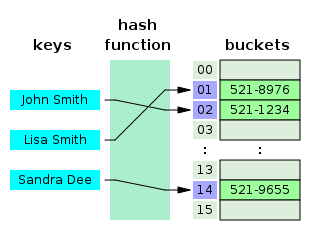
You can use it like this:
hash('dog') % 1d = {'cat': 'cute', # { key : value, }
'dog': 'furry'} # Create a new dictionary with some data
print(d['cat']) # Get an entry from a dictionary; prints "cute"
key = 'cat'
print(d[key])
print('cat' in d) # Check if a dictionary has a given key; prints "True"Adding a new key-value pair
d['fish'] = 'wet'    # Set an entry in a dictionary
print(d['fish'])     # Prints "wet"

d['elephant'] = 'heavy'  # Set an entry in a dictionary
print(d['elephant'])     # Prints "heavy"
Looping through a dictionary
for key, value in d.items():
  print('key = ', key, '\t value = ', value)
for key in d.keys():
print('key = ', key, '\tvalue = ', d[key])for key in sorted(d.keys()): # sorting the key
print('key = ', key, '\t\tvalue = ', d[key])for value in sorted(d.values()): # print all values
print('value = ', value)print('monkey' in d)
# print(d['monkey']) # KeyError: 'monkey' not a key of dFor dictionaries, we can use the get() method to set a default value that will be returned if the requested key doesn’t exist.
print(d.get('monkey', 'N/A'))  # Get an element with a default; prints "N/A"
print(d.get('fish', 'N/A'))    # Get an element with a default; prints "wet"
Removing a key-value pair
del d['fish']        # Remove an element from a dictionary

# Be aware that the deleted key-value pair is removed permanently.
print(d.get('fish', 'N/A')) # "fish" is no longer a key; prints "N/A"
You can find all you need to know about dictionaries in the documentation.
It is easy to iterate over the keys in a dictionary:
d = {'person': 2, 'cat': 4, 'spider': 8}
for animal, legs in d.items():
    print('A {} has {} legs'.format(animal, legs))
Dictionary comprehensions: These are similar to list comprehensions, but allow you to easily construct dictionaries. For example:
nums = [0, 1, 2, 3, 4]
even_num_to_square = {x: x ** 2 for x in nums if x % 2 == 0}
print(even_num_to_square)Tuples
A tuple is an (immutable) ordered list of values. Python refers to values that cannot change as immutable, and an immutable list is called a tuple.
dimensions = (800, 600)
print(dimensions[0])
print(dimensions[1])
Note that comma creates a tuple not parantheses. Always use parantheses to increase readability.
dimensions = 800, 600
print(dimensions[0])
print(dimensions[1])
# Try this (uncomment)
# dimensions[0] = 1000 # this will return errorA tuple is in many ways similar to a list; one of the most important differences is that tuples can be used as keys in dictionaries and as elements of sets, while lists cannot. Here is a trivial example:
d = {(x, x + 1): x for x in range(10)}  # Create a dictionary with tuple keys
t = (5, 6)       # Create a tuple
print(type(t))
print(d[t])
print(d[(1, 2)])
Any sequence (list, tuple, set) can be unpacked into individual variables.
dimensionx, dimensiony = dimensionsx, y, z = [1, 2, 3] # Lists can be used for Multiple assignment
print(x, y, z)x, y, *rest = range(10) # Lists can be used for Multiple assignment
x, y, restx, y, z = 1, 2, 3 # Tuples can be used for Multiple assignment
print(x, y, z)Flow Control
fruits = ["apple", "banana", "cherry"]
for x in fruits:
  print(x)
for x in "banana": # string is also a sequence type
print(x)fruits = ["apple", "banana", "cherry"]
for x in fruits:
if x == "banana":
break
print(x)fruits = ["apple", "banana", "cherry"]
for x in fruits:
if x == "banana":
continue
print(x)# Shows while loop. Do not use this style though, prefer for loop.
# This style is considered not Pythonic
# https://peps.python.org/pep-0008/
idx = 0
while (idx < len(fruits)):
print(fruits[idx])
idx += 1age = 19
if age >= 18:
print("You are old enough to vote!")
else:
print("Sorry, you are too young to vote.")age = 12
if age < 4:
price = 0
elif age < 18:
price = 25
else:
price = 40
print(f"Your admission cost is ${price}.")Differences from C
There is no do {} while() in Python.
Truth value testing
Any objects can be tested for truth value in if and while statements. Most objects are considered true, except the following ones which are considered false:
constants defined to be false: None and False.
zero of any numeric type: 0, 0.0, 0j, Decimal(0), Fraction(0, 1)
empty sequences and collections: ‘’, (), [], {}, set(), range(0)
Functions
Python functions are defined using the def keyword. For example:
# Making the argument b and c optional with 4 and 8 as default values
def sum2(a, b=4, c=8):
  return a + b + c, a*b*c # Returns a tuple of two values
sum2(1, c=5)sum_, prod_ = sum2(1, c=5) # Unpacking a tupleprod_def sign(x, y=100):
if x > 0:
return 'positive', 123
elif x < 0:
return 'negative', 123
else:
return 'zero', 123
for x in [-1, 0, 1]:
v1, _ = sign(x)
print(v1)We will often define functions to take optional keyword arguments, like this:
def hello(name, loud=False):
    if loud:
        print('HELLO, {}'.format(name.upper()))
    else:
        print('Hello, {}!'.format(name))

hello('Bob')
hello('Fred', loud=True)
Modifing a list in a function
When you pass a list to a function, the function can modify the list.
def fun(list):
  list.append('new item')

a = [1, 2, 3]
fun(a)
print(a)
If you want to prevent a function from modifying a list, you can send a copy of a list to the functiondef fun(lst):
lst.append('new item')
a = [1, 2, 3]
# Preventing a Function from Modifying a List
fun(a[:]) # The slice notation [:] makes a copy of the list
# fun(a.copy())
print(a)Question 10
Write a function named “first_last” that returns a list that contains only the first and the last element of a given list
def first_last(a):
    fst_last = ...
    return fst_last

first_last([1, 2, 3, 4, 5])
Variable Scope
The LEGB scope lookup rule. When a variable is referenced, Python searches for it in this order: in the local scope, in any enclosing functions’ local scopes, in the global scope, and finally in the built-in scope. The first occurrence wins. The place in your code where a variable is assigned usually determines its scope. In Python 3, nonlocal declarations can also force names to be mapped to enclosing function scopes, whether assigned or not.
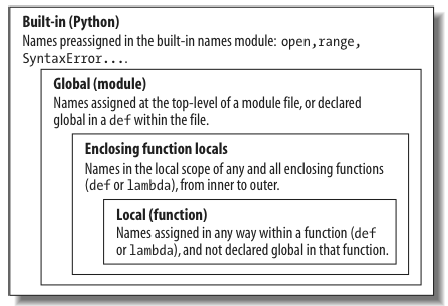
X = 99
def func():
    # new variable
    X = 88
    def func1():
        def func2():
            # new variable
            nonlocal X
            X = 66
        func2()
    func1()
    print(X)
func()
# Global scope
X = 99 # X and func assigned in module: global
def func(Y): # Y and Z assigned in function: locals
global X
X = 11
# Local scope
Z = X + Y # X is a global
print("Local X", X)
for i in range(10):
z = 8
if True:
flag = 'true'
print(flag)
return Z
func(1) # func in module: result=100
print("Global X", X)X = 99 # Global scope name: not used
def f1():
X = 88 # Enclosing def local
def f2():
print(X) # Reference made in nested def
f2()
f1() # Prints 88: enclosing def local
print(X)X = 99 # Global X
def func():
X = 88 # Local X: hides global
func()
print(X) # Prints Global X 99: unchangedThe assignment within the function creates a local X that is a completely different variable from the global X in the module outside the function.
X = 99 # Global X

def func():
  global X
  X = 88 # Local X: overrides global

func()
print(X) # Prints 88: unchanged
for x in range(100):
pass
# what is x
xx = 0
for i in range(100):
if i % 23 == 0:
x = 23
else:
x = 1
# what is x?
xx = 0
def foo():
for i in range(100):
if i % 23 == 0:
x = 23
else:
x = 1
# what is x?
xQuestion 11 : Implement a sqrt function
As a way to play with functions and loops, let’s implement a square root function: given a number x, we want to find the number z for which z² is most nearly x.
Computers typically compute the square root of x using a loop. Starting with some guess z, we can adjust z based on how close z² is to x, producing a better guess:
Repeating this adjustment makes the guess better and better until we reach an answer that is as close to the actual square root as can be.
Implement this in the def sqrt provided. A decent starting guess for z is 1, no matter what the input. To begin with, repeat the calculation 10 times and print each z along the way. See how close you get to the answer for various values of x (1, 2, 3, …) and how quickly the guess improves.
Next, change the loop condition to stop once the value has stopped changing (or only changes by a very small amount). See if that’s more or fewer than 10 iterations. Try other initial guesses for z, like x, or x/2. How close are your function’s results to the math.sqrt in the standard library?
(Note: If you are interested in the details of the algorithm, the z² − x above is how far away z² is from where it needs to be (x), and the division by 2z is the derivative of z², to scale how much we adjust z by how quickly z² is changing. This general approach is called Newton’s method. It works well for many functions but especially well for square root. Newton’s methods is particular form of gradient descent.)
def sqrt(x, threshold=1e-8):
    assert x >= 0 # throws an error if x is negative
    ...

sqrt(2)
x = 2; z = sqrt(x)
assert abs(z*z - x) < 1e-8
x = 3; z = sqrt(x)
assert abs(z*z - x) < 1e-8
x = 4; z = sqrt(x)
assert abs(z*z - x) < 1e-8
import random
for _ in range(10):
x = random.randint(1, 100); z = sqrt(x)
assert abs(z*z - x) < 1e-6
'success'Asterisks in Python
3 * 53 ** 5# Using * to unpack iterables into a list/tuple
numbers = [2, 1, 3, 4, 7]
more_numbers = [*numbers, 11, 18]
print(*more_numbers, sep=', ')
first, *rest = [*numbers, 11, 18]
print(rest, sep=', ')# Unpack a dictionary
date_info = {'year': "2020", 'month': "01", 'day': "01"}
filename = "{year}-{month}-{day}.txt".format(**date_info)
print(filename)zip
The zip() function takes iterables (can be zero or more), aggregates them in a tuple, and returns it.
languages = ['Java', 'Python', 'JavaScript']
versions = [14, 3, 6]

result = list(zip(languages, versions))
print(result)
zip is almost the inverse of itself. It result in the same lists that you started with.
list(zip(*result))mat = [[1, 2, 3],
[4, 5, 6]]
mat_transpose = list(zip(*mat))
print(mat_transpose)
print(list(zip(*mat_transpose)))for (x, y) in zip(languages, versions): # pairs of items pulled from two lists
print(x, y)keys = ['spam', 'eggs', 'toast']
vals = [1, 3, 5]
D2 = {}
for (k, v) in zip(keys, vals):
D2[k] = v
D2zip function is more general than this example suggests. For instance, it accepts any type of sequence (really, any iterable object, including files), and it accepts more than two arguments. With three arguments, as in the following example, it builds a list of three-item tuples with items from each sequence, essentially projecting by columns (technically, we get an N-ary tuple for N arguments):
T1, T2, T3 = (1,2,3), (4,5,6), (7,8,9)
list(zip(T1, T2, T3))
The * operator can be used in conjunction with zip() to unzip the list.
coordinate = ['x', 'y', 'z']
value = [3, 4, 5]

result = zip(coordinate, value)
result_list = list(result)
print(result_list)

c, v =  zip(*result_list)
print('c =', c)
print('v =', v)Classes
Defining a Class
The closest thing you can do in C to definiing a class is define a struct with functions.
int length(struct date) {
    return date.year * 365 + date.month * 30;// convert date into ssome form of legnth
}
struct date {
     int year;
     int month;
    (int) (*length)(struct date); // function pointer
}
struct date dt;
dt.year = 1996;
dt.month = 10;
dt.length(dt); // have to repeat the struct to access the function and to call the function
The syntax for defining classes in Python is :
class Date:
    def __init__(self, year, month):
        self.year = year
        self.month = month
    def length(self):
        return self.year * 365 + self.month * 30 # convert date to some form of length
date = Date(1996, 10)
date.length() # No repeated calling to to access the function and as an argument to the function
class Addition:
# first = 0
# second = 0
answer = 0 # Class member
# parameterized constructor
def __init__(self, first, second):
self.first = first
self.second = second
def calculate(self):
self.answer = self.first + self.second
# creating object of the class
# this will invoke parameterized constructor
Add = Addition
obj = Add(1000, 2000)
# closures (inside out classes where functionwraps the class data)
def counter(count_init):
counter = count_init
def increment(inc):
nonlocal counter
counter = counter + inc
return counter
return increment
c_inc = counter(0)
c_inc(5)
c_inc(3)class Person:
# Constructor
def __init__(self, name):
self.name = name # Create an instance variable
# Instance method
def getName(self):
return self.name
# To check if this person is an employee
def isEmployee(self):
return False
# Making an instance from a class
g = Person('Fred') # Construct an instance of the Person class
# Accessing attributes
print(g.name)
# Calling methods
print(g.getName())The self parameter is required in the method definition, and it must come first before the other parameters. It must be included in the definition because when Python calls this method later (to create an instance), the method call will automatically pass the self argument.
Every method call associated with an instance automatically passes self, which is a reference to the instance itself; it gives the individual instance access to the attributes and methods in the class.
In a class, the implicit behavior of passing the object as the first argument is avoided if a method is declared as static, as shown in the following example.
class A(object):

    @staticmethod
    def stat_meth():
        print("Look no self was passed")

a = A()
a.stat_meth()Inheritance
Inheritance is the capability of one class to derive or inherit the properties from another class. The benefits of inheritance are:
It represents real-world relationships well.
It provides reusability of a code. We don’t have to write the same code again and again. Also, it allows us to add more features to a class without modifying it.
It is transitive in nature, which means that if class B inherits from another class A, then all the subclasses of B would automatically inherit from class A.
# Inherited or Subclass (Note Person in bracket)
class Employee(Person):

    # Constructor
    def __init__(self, name, year):
        self.years = year  # Create an instance variable
        super().__init__(name)

    # Overriding Methods from the Parent Class
    def isEmployee(self):
        return True

# Driver code
emp = Person("Geek1")  # An Object of Person
print(emp.getName(), emp.isEmployee())

emp = Employee("Geek2", 20) # An Object of Employee
print(emp.getName(), emp.isEmployee())Iterators
An iterator is an object that can be iterated upon, meaning that you can traverse through all the values.
mytuple = ("apple", "banana", "cherry")
myit = iter(mytuple) # define

print(next(myit)) # apple
print(next(myit)) # banana
print(next(myit)) # cherry
# Try this (uncomment)
# print(next(myit)) # raises StopIteration exception (not all exceptions are errors)
Strings, lists, tuples, dictionaries, and sets are all iterable objects.
mystr = "banana"
myit = iter(mystr)

print(next(myit))
print(next(myit))
print(next(myit))
print(next(myit))
print(next(myit))
print(next(myit))
Looping Through an Iterator
C-style approach
mytuple = ("apple", "banana", "cherry")
i = 0
while (i < len(mytuple)):
    print(mytuple[i])
    i += 1
A better approach
mytuple = ("apple", "banana", "cherry")

print(mytuple)

for idx, val in enumerate(mytuple):
  print(idx, val)
mytuple = ("apple", "banana", "cherry")
print(mytuple)
for val in mytuple:
print(val)mystr = "banana"
for x in mystr:
print(x)# Iterating over dictionary
d = dict()
d['xyz'] = 123
d['abc'] = 345
for i in d :
# print("%s %d" %(i, d[i]))
print("{}\t{}".format(i, d[i]))Create an Iterator
To create an object/class as an iterator, you have to implement the methods __iter__() and __next__() to your object.
__iter__ method that is called on initialization of an iterator. This should return an object that has a __next__ method.
__next__ should return the next value for the iterable. This method should raise a StopIteration to signal the end of the iteration.
class MyNumbers:
  def __iter__(self):
    self.a = 1
    return self

  def __next__(self):
    x = self.a
    self.a += 1
    return x

myinstance = MyNumbers()
myiter = iter(myinstance)

print(next(myiter))
print(next(myiter))
print(next(myiter))
print(next(myiter))
print(next(myiter))
Stop after 10 iterations by raising the StopIteration exception
class MyNumbers:
  def __iter__(self):
    self.a = 1
    return self

  def __next__(self):
    if self.a <= 10:
      x = self.a
      self.a += 1
      return x
    else:
      raise StopIteration

myclass = MyNumbers()
myiter = iter(myclass)
thing = ["Apple", "Audi", "Pasta", "dog", "UMAINE"]
category = ["fruit", "car",  "food", "animal"]

zipped = zip(thing, category)
zipped_l = list(zipped)
print(zipped_l)
print(list(zip(zipped_l[0], zipped_l[1], zipped_l[2], zipped_l[3])))
zip function
Combine mulitple iterator
# Two separate lists
thing = ["Apple", "Audi", "Pasta", "dog", "UMAINE"]
category = ["fruit", "car",  "food", "animal"]

# Combining lists and printing
for t, c in zip(thing, category):
    print("{} is {}".format(t, c))
Use “*” operator to unzip
l1,l2 = zip(*[('Apple', 'fruit'),
              ('Audi', 'car'),
              ('Pasta', 'food')
           ])

# Printing unzipped lists
print(l1)
print(l2)
yield vs return
Unlike normal functions that return a value and exit, generator functions automatically suspend and resume their execution and state around the point of value generation. Because of that, they are often a useful alternative to both computing an entire series of values up front and manually saving and restoring state in classes. Because the state that generator functions retain when they are suspended includes their entire local scope, their local variables retain information and make it available when the functions are resumed.
The chief code difference between generator and normal functions is that a generator yields a value, rather than returning one—the yield statement suspends the function and sends a value back to the caller, but retains enough state to enable the function to resume from where it left off. When resumed, the function continues execution immediately after the last yield run. From the function’s perspective, this allows its code to produce a series of values over time, rather than computing them all at once and sending them back in something like a list.
def simpleGeneratorFun():
    x = 5
    # print(x)
    yield 1 + x

    x = 2*x
    #print(x)
    yield 1 + x


    x = 2*x
    #print(x)
yield 1 + xsimpleGeneratorFun()the next(X) built-in calls an object’s
X.__next__() method for us:
x = simpleGeneratorFun()
next(x)list(simpleGeneratorFun())# Driver code to check above generator function
# simpleGeneratorFun()
list(simpleGeneratorFun())
#for value in simpleGeneratorFun():
# print(value)Yield are used in Python generators. A generator function is defined like a normal function, but whenever it needs to generate a value, it does so with the yield keyword rather than return. If the body of a def contains yield, the function automatically becomes a generator function.
def nextSquare():
    i = 1;

    # An Infinite loop to generate squares
    while True:
        yield i*i
        i += 1  # Next execution resumes
                # from this point

# Driver code to test above generator
# function
for num in nextSquare():
    if num > 100:
         break
    print(num)
Modules and Packages
# Packages are stored on PyPi servers by default and can be directly installed from github as well.
!pip install import-ipynb
import import_ipynb%%writefile myModule.py
s = "hi from my module"Every python file is a module and can be imported. import executes everything in the module.
import myModuleimport sys
import os
dirpath = os.getcwd()
print("current directory is : " + dirpath)
foldername = os.path.basename(dirpath)
print("Directory name is : " + foldername)You can create nested modules by directory structure:
!mkdir -p my_moduleYou can not import an empty directory. You have to drop (maybe empty) __init__.py in the directory.
%%writefile my_module/__init__.py
""" My module is the best module ever. """
def identity(x):
    """ This function always returns what it is given """
    return x
Now you can import my_module.
import my_module
help(my_module)
You can move python files into hierarchies and directories.
!cp myModule.py my_moduleimport my_module.myModule as mmmm
mmmm.sRead More
False await else import pass None break except in raise True class finally is return and continue for lambda try as def from nonlocal while assert del global not with async elif if or yield