Ways to run Python (Tutorial)
Four ways to run Python on Google servers through Colab, Your laptop or on briges2.psc.edu
Method 1: Directly on Windows on your machine
Install Python 3.10 from python.org
Install VSCode from app store
Install Python extension in VSCode
Launch VS Code Quick Open (Ctrl+P), paste the following command, and press enter.
ext install ms-python.pythonMethod 4: On Bridges2.PSC.EDU
An ACCESS ID for you has been created. Look for an email from
[email protected]with subject “ECE 490/590 Access ID created”Follow the new user instructions
Login to allocations
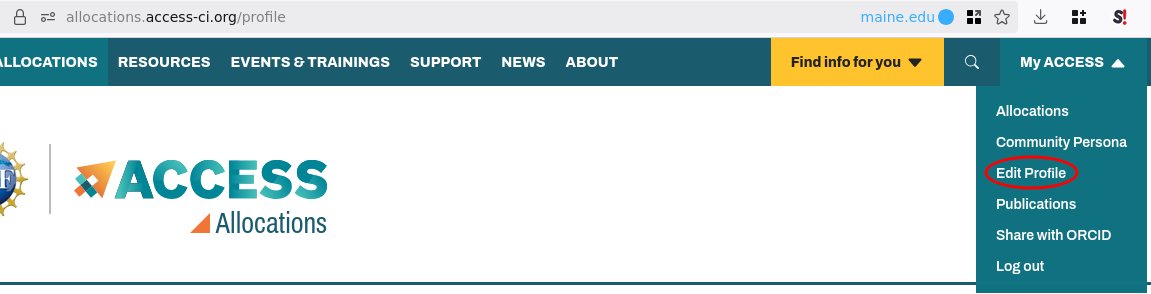
.access -ci .org and click on “My ACCESS” > “Edit Profile”
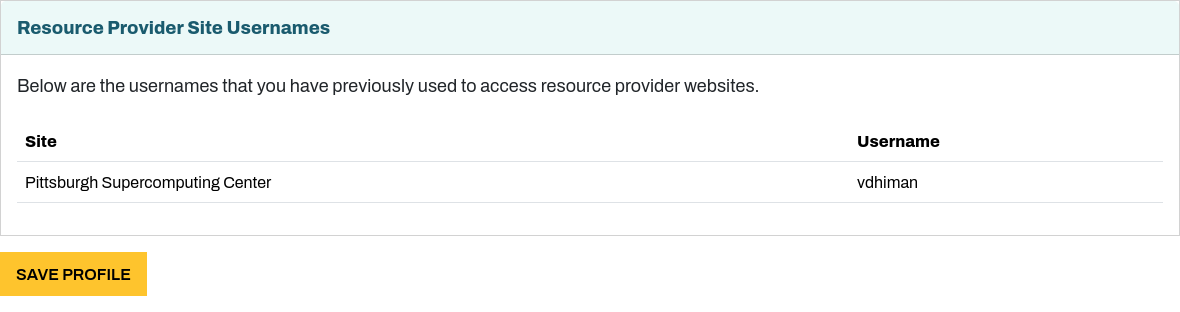
Scroll down to the bottom to find “Resource Provider Site Usernames”, specifically the Username corresponding to Pittsburgh Supercomputing Cluster. Note down that username. We will be using that username going forward.
Set your password using the PSC Password Change Utility
Running Jupyter on PSC with SLURM
Follow next set of instructions to run jupyter on PSC with SLURM
Method 2: WSL (Windows subsystem for Linux) on Windows on your machine.
Install PowerShell on Windows Installing PowerShell on Windows
Install Windows Subsystem for Linux
wsl --installList the Ubuntu versions available to be installed
wsl --set-default-version 2
wsl --list --online
Install Ubuntu 22.04
wsl --install -d Ubuntu-22.04Launch wsl: Press Windows, search wsl
Within WSL
In WSL>Ubuntu-22.04 python comes pre-installed.
Launch WSL
Type
python3, press enterEnter any python code
print("hello world!")Press enter.
Within WSL as a file
Launch WSL
Create a text file using notepad or your favorite editer. Enter any python code within the file.
print("hello world!")Save the file as first.py
From the terminal run the python script
first.py
user@machine:~$ python3 first.py
hello world!
Install Jupyter lab
Launch WSL
Install pip
user@machine:~$ sudo apt install python3-pipInstall Jupyter lab using pip
user@machine:~$ pip3 install --user jupyterlabRun Jupyter lab
user@machine:~$ jupyter lab --ip $(hostname -I)Open the URL printer on the screen with the token in a browser of your choice.
Click on Notebook > Python 3 > ipykernel
Enter any python code
print("hello world!")Press Ctrl+Enter
Easiest: Method 3: Google colab
Enter any python code
print("hello world!")Press Control+Enter to run
The colab notebooks are saved in your Google drive > Colabs. You can organize them by clicking on File > Move
Terms
- job
- A unit of computational task that the cluster is asked to complete.
- scheduler
- A software framework that decides how to allocate jobs to available resources (computers/nodes). Examples include SLURM, PBS TORQUE, kube-scheduler.
- nodes
- Computers in a cluster setting.